AI first draft
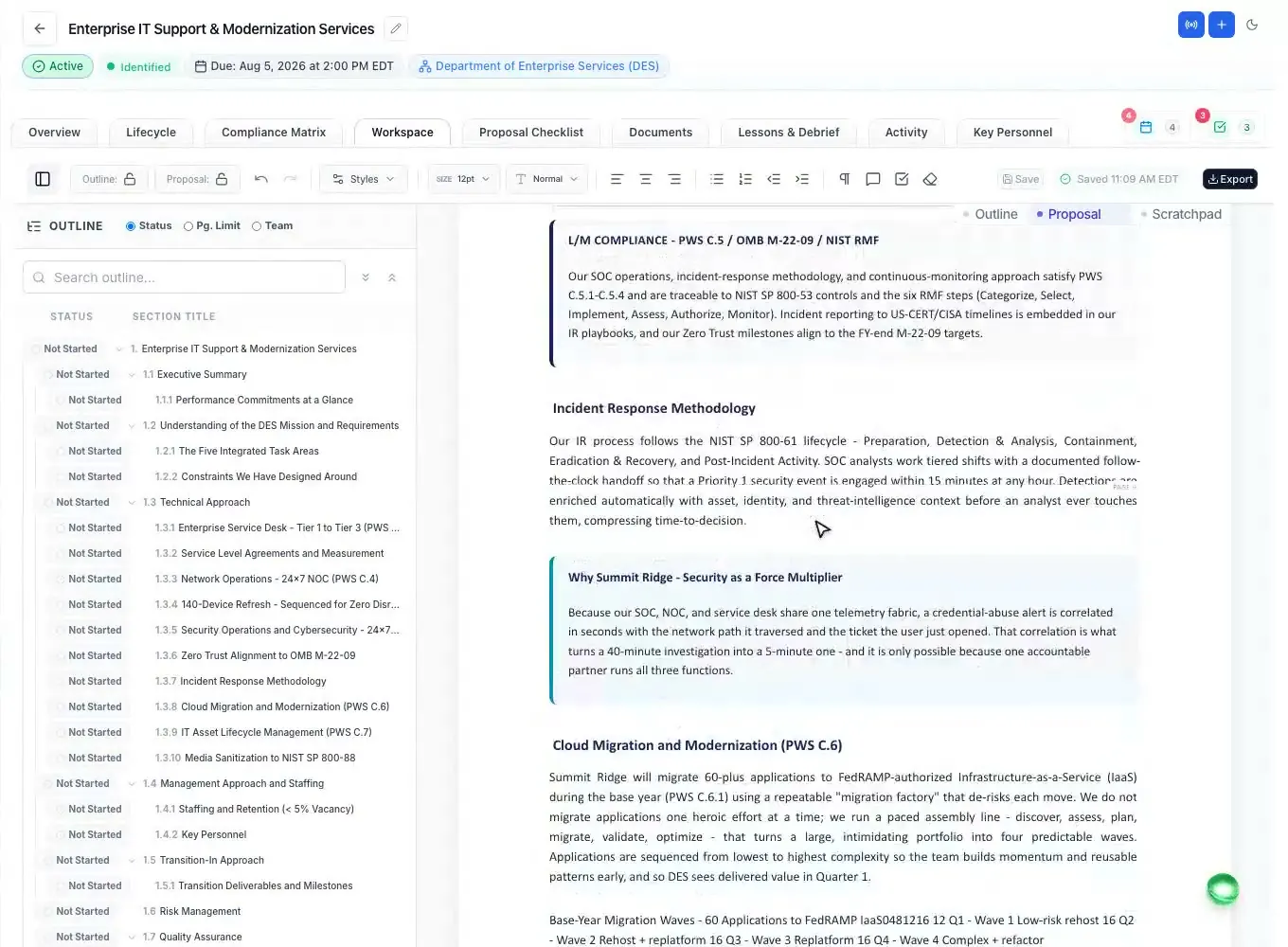
Every section drafted from the outline and your Company Library, with input markers.
Read moreAI proposal writing
Updated
An AI proposal writer drafts proposal sections for you. ProposalWorkspace's built-in AI writes the first draft of every section from your compliant outline and your own Company Library, marks where your input is still needed instead of inventing it, and then helps your team polish, check and finish the proposal in a Word-like editor where every AI edit can arrive as a tracked change.
No credit card. Every feature on every plan.
The first draft
A government proposal is scored against what the solicitation asks, so an AI proposal writer is only useful when it writes to the instructions and the evaluation factors, and only says what your company can prove. A fluent paragraph with an invented past performance or a resume claim nobody can back up costs you the evaluation, or worse.
ProposalWorkspace drafts in that order. First the outline is built from the RFP: the volumes and order Section L sets (or a state RFP's own instructions), the words Section M scores, and the subsections the SOW or PWS needs. Then "Generate the first draft with AI" writes every section under that outline, from your Company Library: past performance, people, capabilities and documents. Where the library has no evidence, the draft says so with a clear marker for your team.
Selection by selection
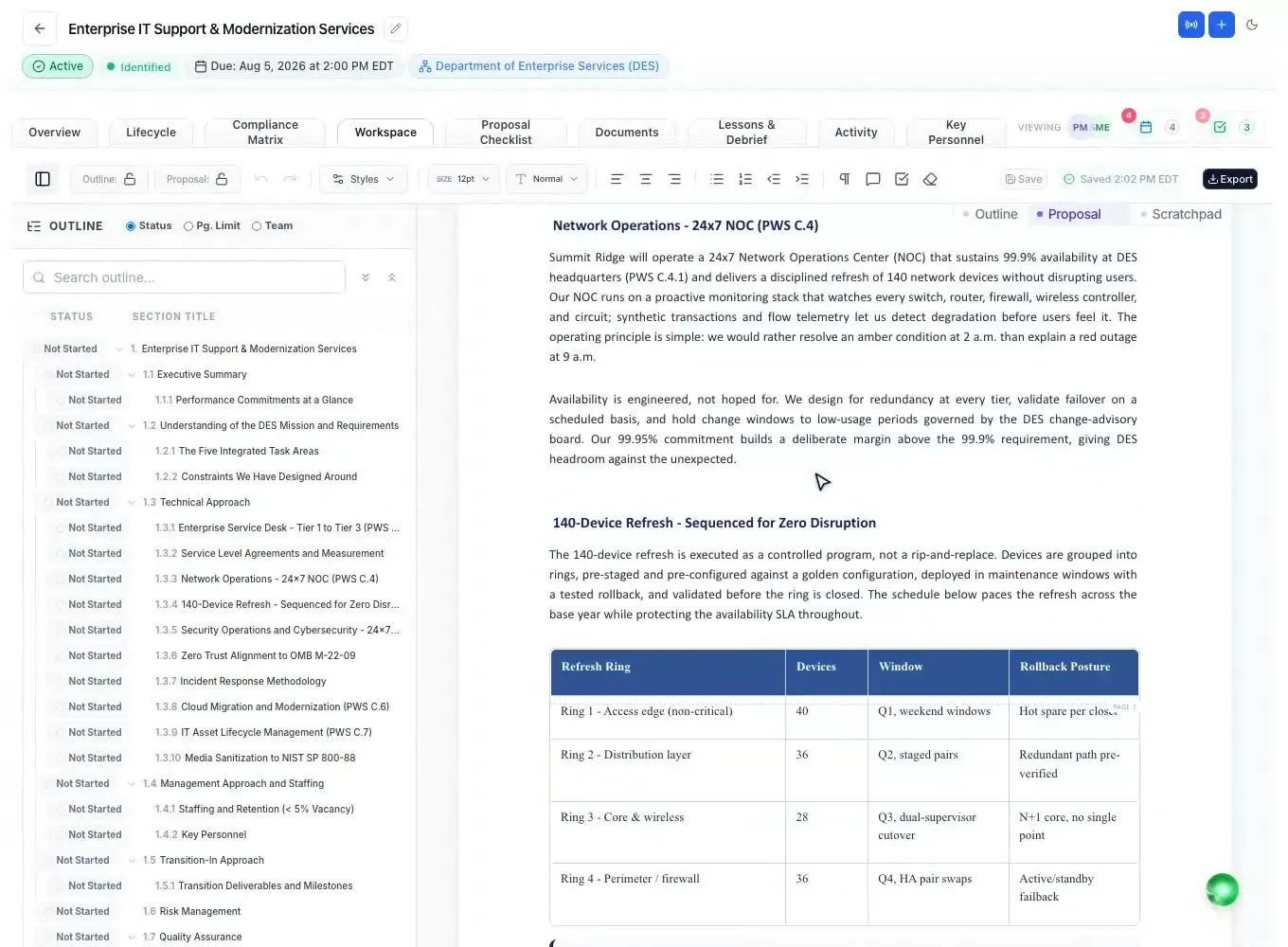
Select any text and ask the AI: polish it (21 presets such as active voice, plain language or a target reading level), draft from it (24 presets), turn it into one of 32 proposal table designs (a compliance matrix, a RACI, a risk register, a staffing table), add one of 29 graphics or 7 charts with a numbered figure caption, or set it in a callout.
With Suggesting mode on, every AI edit lands as a tracked change marked "AI Assistant", next to your teammates' edits, so a reviewer accepts or rejects each one. Margin comments, federal heading numbering and page limits work the way they do in Word.
The AI teammate in the side panel knows the proposal you are in: the outline, the draft, the page limits, the owners and the open comments. Ask it what Section M weighs most, or to rewrite a section to fit the page budget.
Before a reviewer reads it
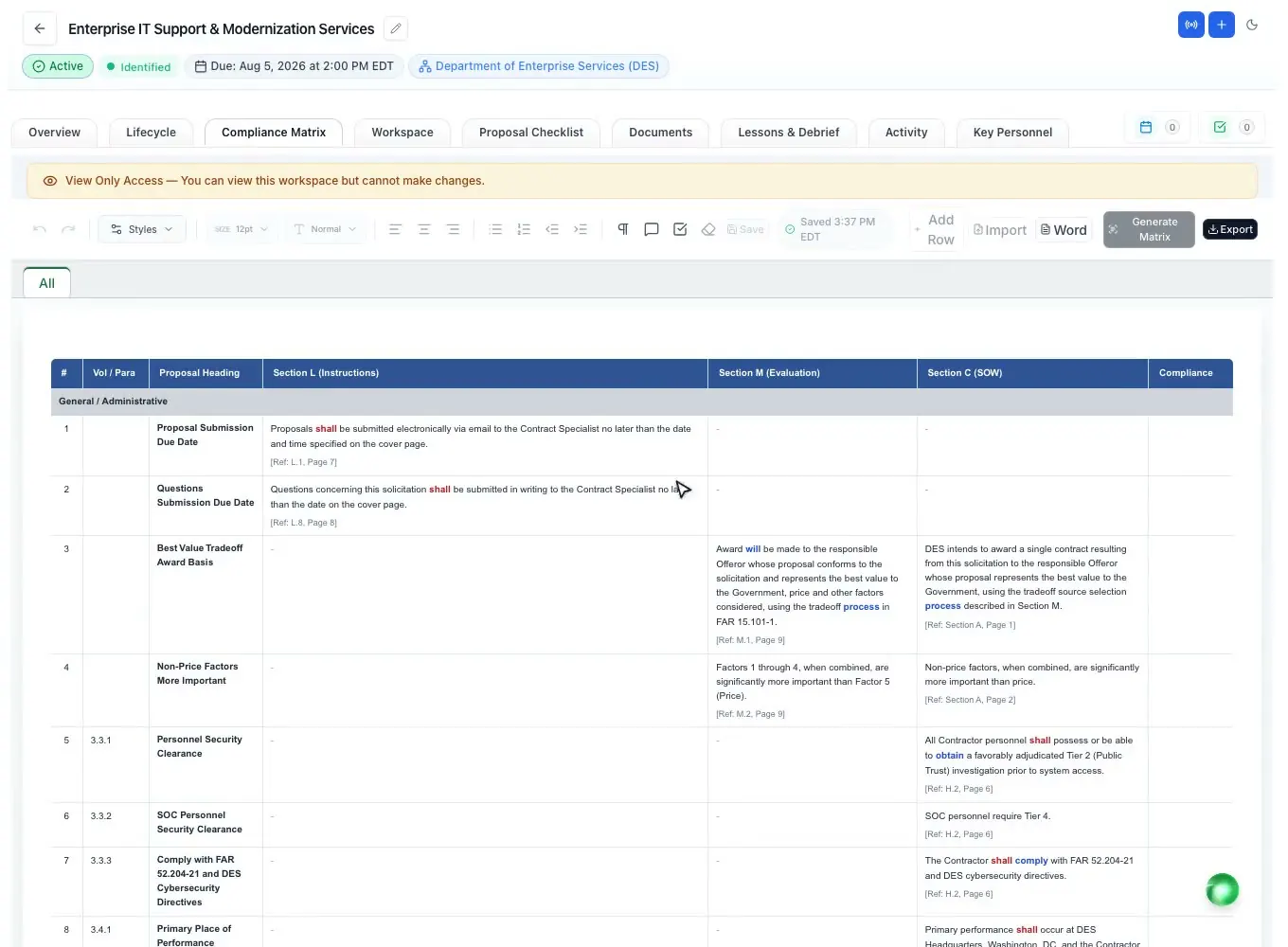
Drafting is half of the job; the other half is proving the draft answers the solicitation. The compliance matrix's proposal check runs every row against the written proposal and reports where each requirement is answered ("Found under") or that it is "Not addressed in the proposal".
For any drafted section, the AI can score the response against its matrix row the way an evaluator would, from 0 to 100, with Pass, Warning or Fail and the reason. Then a person who did not write the proposal signs it off, and a final RFP proposal cannot move to submission without that sign-off.
One AI, both markets
For a federal RFP, the AI writes to the uniform contract format: Section L for structure, Section M for what is scored and Section C or the PWS for the work (FAR 15.204-1; 15.109 in the FAR overhaul text). For a state, county, city or school district RFP, it follows that RFP's own instructions and evaluation criteria, since there is no one state format.
Before you use any AI on a bid, read the solicitation's own rules: some now ask offerors to say whether and how AI was used. If a contract limits which AI providers you may use, ask us which providers the built-in AI uses: support@proposalworkspace.com.
Built-in AI, your workspace
The AI works inside your workspace, on the proposals and the Company Library your role can open. Each workspace is isolated at the data layer, and documents are encrypted in transit and at rest. There is no FedRAMP authorization or SOC 2 report yet, so CUI work is not a fit.
Every plan includes a monthly allowance of AI credits (700 on Solo, 2,500 on Team, 6,000 on Enterprise), and the AI stops when the allowance and any credits you bought are used up, so there is no surprise bill. Already use an AI assistant? Connect it to your workspace through the MCP connector, included on every plan.
How it works
The AI reads the RFP and builds an annotated outline from its instructions, evaluation factors and scope.
Add past performance, people and documents once; every proposal draws on them.
The AI drafts every section in the background and marks what still needs your input.
Polish, tables, graphics and rewrites on any selection, as tracked changes.
Check every requirement against the draft, then a non-writer signs off.
Every feature is on every plan. Plans start at $99 a month billed annually for Solo with 2 seats ($129 billed monthly), with a 7-day free trial and no credit card. Full pricing
In the product
Every section drafted from the outline and your Company Library, with input markers.
Read morePolish, draft, tables, graphics and callouts, landing as tracked changes.
Read moreAn annotated outline from Section L, Section M and the SOW, with writer guidance.
Read moreSections L, M and C as rows, then checked against the written proposal.
Read moreEach resume checked against its job description, with a suggested redline.
Read moreWork in the workspace from the AI assistant your team already uses.
Read moreQuestions people ask
It can write a strong first draft when it works from the solicitation and from your own records. ProposalWorkspace drafts every section from the outline the RFP sets and from your Company Library; your team still reviews, edits and decides what is submitted.
No, and it should not. Evaluators score what the company can prove and commit to. ProposalWorkspace marks where input is missing, every AI edit can be a tracked change, and a final RFP proposal needs a sign-off from someone who did not write it.
It drafts from your Company Library and the RFP, and where there is no evidence it leaves a clear marker instead of a claim. The compliance check then shows which requirements the draft answers and which it does not.
A general chatbot sees only what you paste into it. The built-in AI works on the whole pursuit: the RFP with page cites, the outline, the compliance matrix, your Company Library and the team's comments, and its edits land in the document as tracked changes.
There is no general ban, but read each solicitation: some ask offerors to disclose AI use, and some contracts limit which AI providers may touch the data. If yours does, ask us which providers the built-in AI uses.
We do not publish it on the site, because the model behind a feature can change. If a contract limits which AI providers you may use, email support@proposalworkspace.com and we will tell you which providers the built-in AI uses.
The AI is included on every plan with a monthly allowance of AI credits; plans start at $99 a month billed annually ($129 billed monthly). The 7-day free trial includes 300 AI credits and needs no credit card.
 ProposalWorkspace
Set up in minutes
Free trial, no credit card. Claude connector included.