State and local bid search
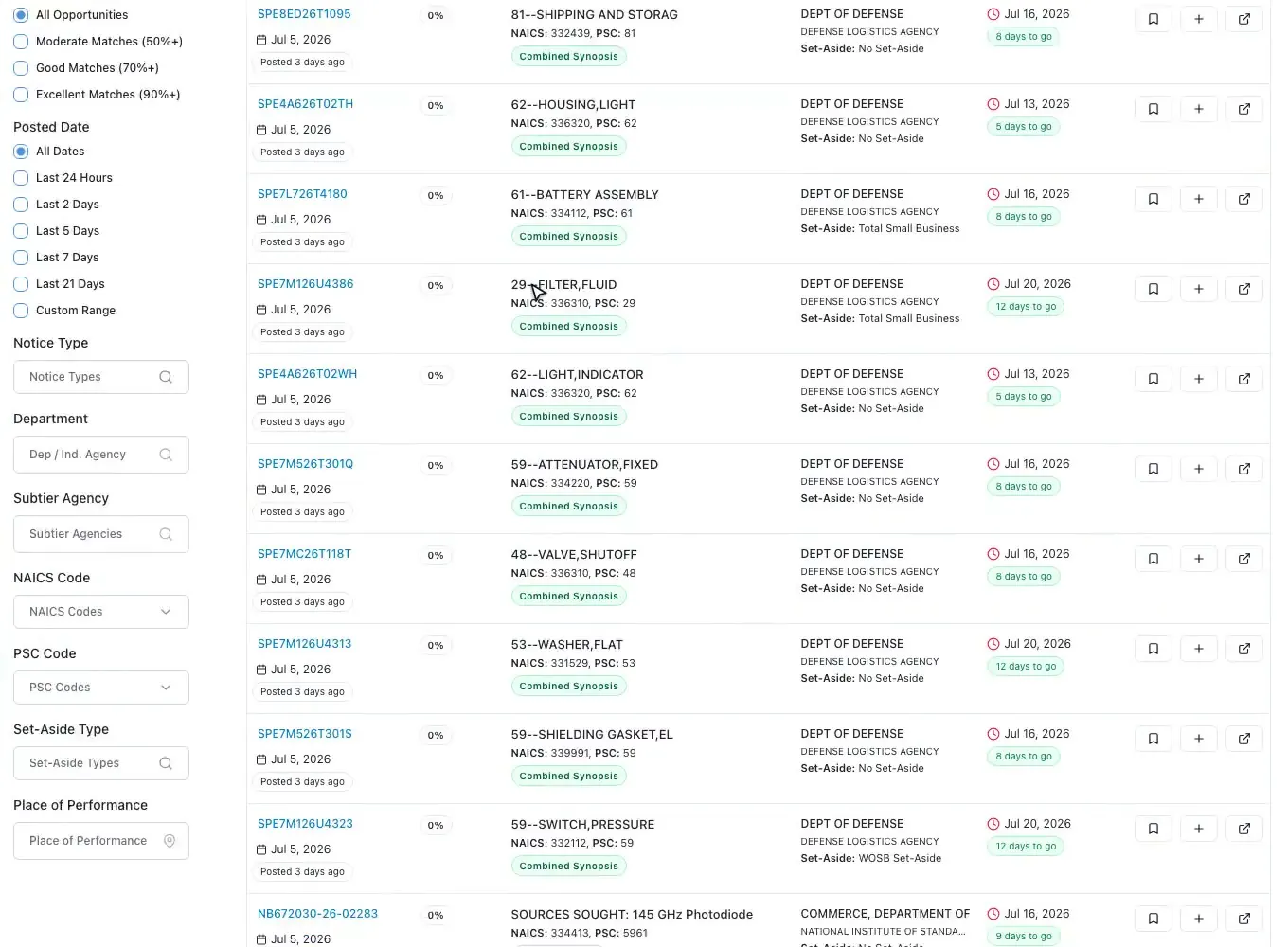
Bids by state, agency type and category, scored against your profile, with email alerts.
Read moreState and local proposal software
Updated
State and local proposal software helps you find state, county, city, school district and university bids and answer them the way each RFP asks. ProposalWorkspace puts state and local bids in the same feed as federal ones, scores each against your company, reads the RFP with page citations, and builds the outline, compliance matrix and first draft from the RFP's own instructions.
No credit card. Every feature on every plan.
State, local and education
A state or local RFP does not follow one federal format. Each state has its own procurement code and portal, and a county, city, school district or university often writes its own instructions. Instead of Section L and Section M you find "instructions to proposers", "proposal format" or "submittal requirements", and "evaluation criteria" with points per category.
The forms differ too: many state and local bids ask for signed forms, affidavits or notarized pages, insurance certificates, references from public agencies, or a local business or preference certification. A price sheet in the agency's own format is common, and some bids still want a sealed paper copy as well as a portal upload.
That is why state and local proposal software has to read each RFP as it is written, rather than expect one template.
State and local bid search
State and local bids sit in the same workspace as federal ones, with their own tab. Filter by state, notice type (RFP, RFQ, RFI, IFB or ITB), category, posted date, status, match score, agency name and agency type: state agency, county, city or town, school district, college or university, or special district.
Each bid is scored from 0 to 100 against your business profile, and a saved search sends the new matches to your inbox. Search in plain words, or paste a description of what you do and the AI turns it into search keywords for state and local bids.
Browse the open bids for free, state by state: Texas, California, Florida, New York and every other state.
Analysis with citations
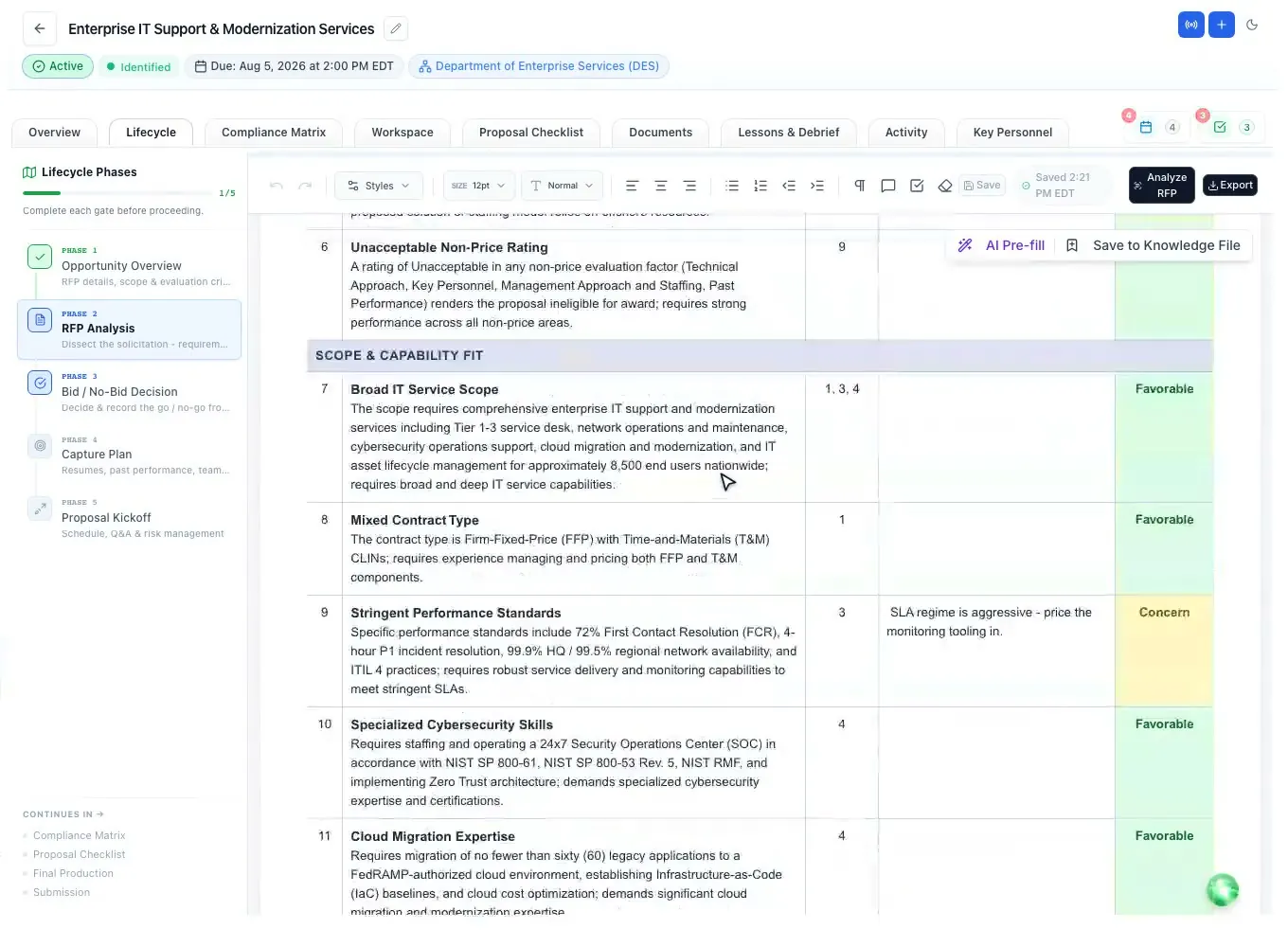
Add a bid to a proposal and the RFP files come with it. The AI lists every requirement, evaluation criterion, key date, required form and submission rule with the page it came from, and fills the proposal's dates from the RFP: questions due, pre-bid meeting, site visit and the due date.
The bid/no-bid worksheet marks each factor Favorable, Concern or Showstopper, so a missing license or an unrealistic deadline shows up before the team spends a week writing. When the RFP is unclear, the Q&A Center drafts the questions for the procurement officer, each linked to its source.
Answer what this RFP asks
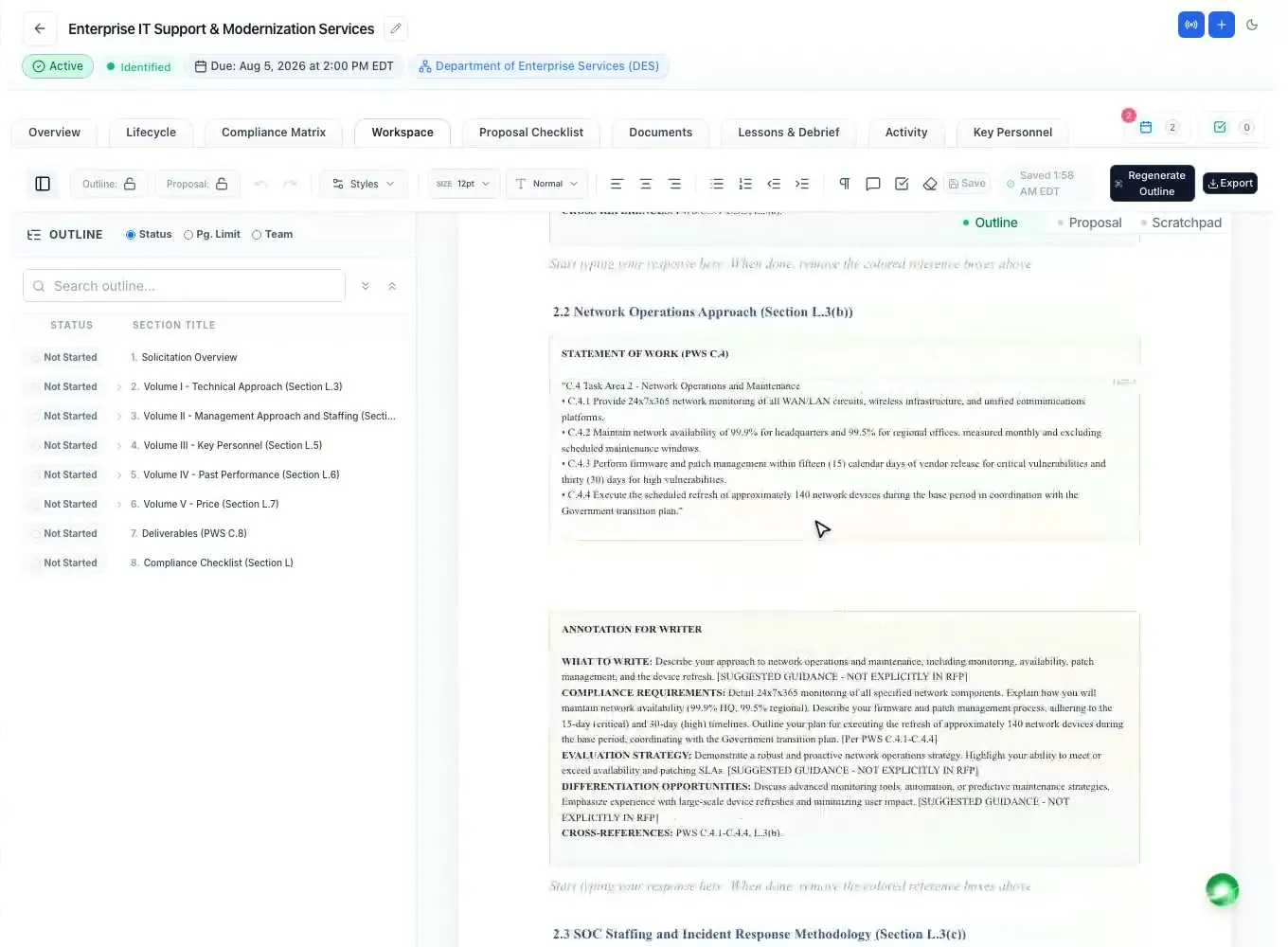
The annotated outline uses the volume names and order the RFP's own instructions set, places each response under the instruction it answers, and adds the page or item limits where the RFP states them, with writer guidance under every heading.
The compliance matrix lists every instruction, evaluation criterion and scope requirement as a row with an owner and a compliance call, with the mandatory words (shall, must, will) highlighted. The submission checklist collects the forms, signatures, copies and formatting rules, so nothing is left for the last night.
Want an outline built by our proposal team instead? Ready-made outlines for open state and local RFPs are on sale, and pre-buy packages cover any RFP.
Draft, review, export
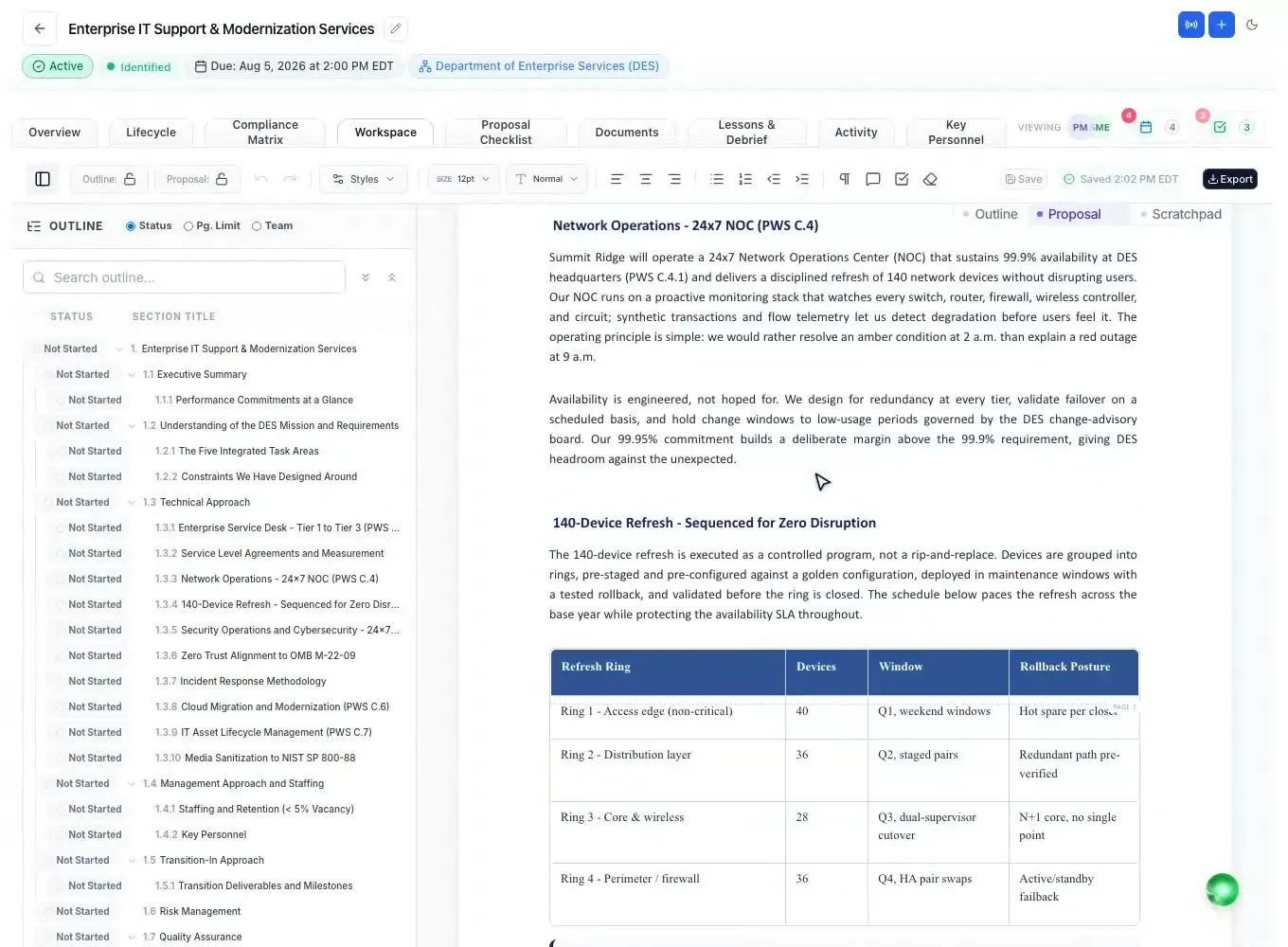
The AI drafts each section from the outline and from your Company Library: your past performance, your people and your documents, with clear markers where your input is still needed. Edit in a Word-like editor with tracked changes and comments, then export to Word or PDF in the format the agency asked for.
Teaming on a state bid? Send a data call to a partner and their answers come back into the workspace. Key personnel, resumes and letters work the same way as on a federal bid.
How it works
Filter state and local bids by state, agency type and category, or save a search and get the matches by email.
The AI lists every requirement, criterion, form and date with its page.
Mark each bid/no-bid factor; a showstopper stops the bid before the writing starts.
Outline, matrix and checklist follow the RFP's own headings; the first draft comes from your records.
Export to Word or PDF and submit through the portal, email or on paper, as the RFP says.
Every feature is on every plan. Plans start at $99 a month billed annually for Solo with 2 seats ($129 billed monthly), with a 7-day free trial and no credit card. Full pricing
In the product
Bids by state, agency type and category, scored against your profile, with email alerts.
Read moreEvery requirement and form with its page cite, and a bid/no-bid worksheet.
Read moreInstructions, criteria and scope as owned rows, with Excel and Word export.
Read moreOutline, AI first draft, tracked changes and Word or PDF export.
Read moreAsk teaming partners for their input and get it back inside the proposal.
Read moreForms, signatures, copies and formatting rules from the RFP, item by item.
Read moreQuestions people ask
SLED stands for state, local and education. SLED proposal software helps you find bids from state agencies, counties, cities, school districts and universities, and write proposals that follow each agency's own instructions and evaluation criteria.
Bids from state agencies, counties, cities and towns, school districts, colleges and universities and special districts, in the same workspace as federal bids. The state bid lists, one per state, are free to browse.
Usually not. A state or local RFP has its own "instructions to proposers" or "submittal requirements" and its own evaluation criteria. ProposalWorkspace builds the outline and the compliance matrix from whatever headings that RFP uses.
Yes. Save a search with your states, categories and agency types, and new matching bids are emailed to you every day.
The AI lists every required form, signature and attachment with its page in the RFP, and the submission checklist tracks each one. You fill in and sign the forms; ProposalWorkspace does not sign or submit for you.
ProposalWorkspace starts at $99 a month billed annually ($129 billed monthly) for 2 seats, with every feature, federal and state alike. The free trial lasts 7 days and needs no credit card.
 ProposalWorkspace
Set up in minutes
Free trial, no credit card. Claude connector included.