AI outline
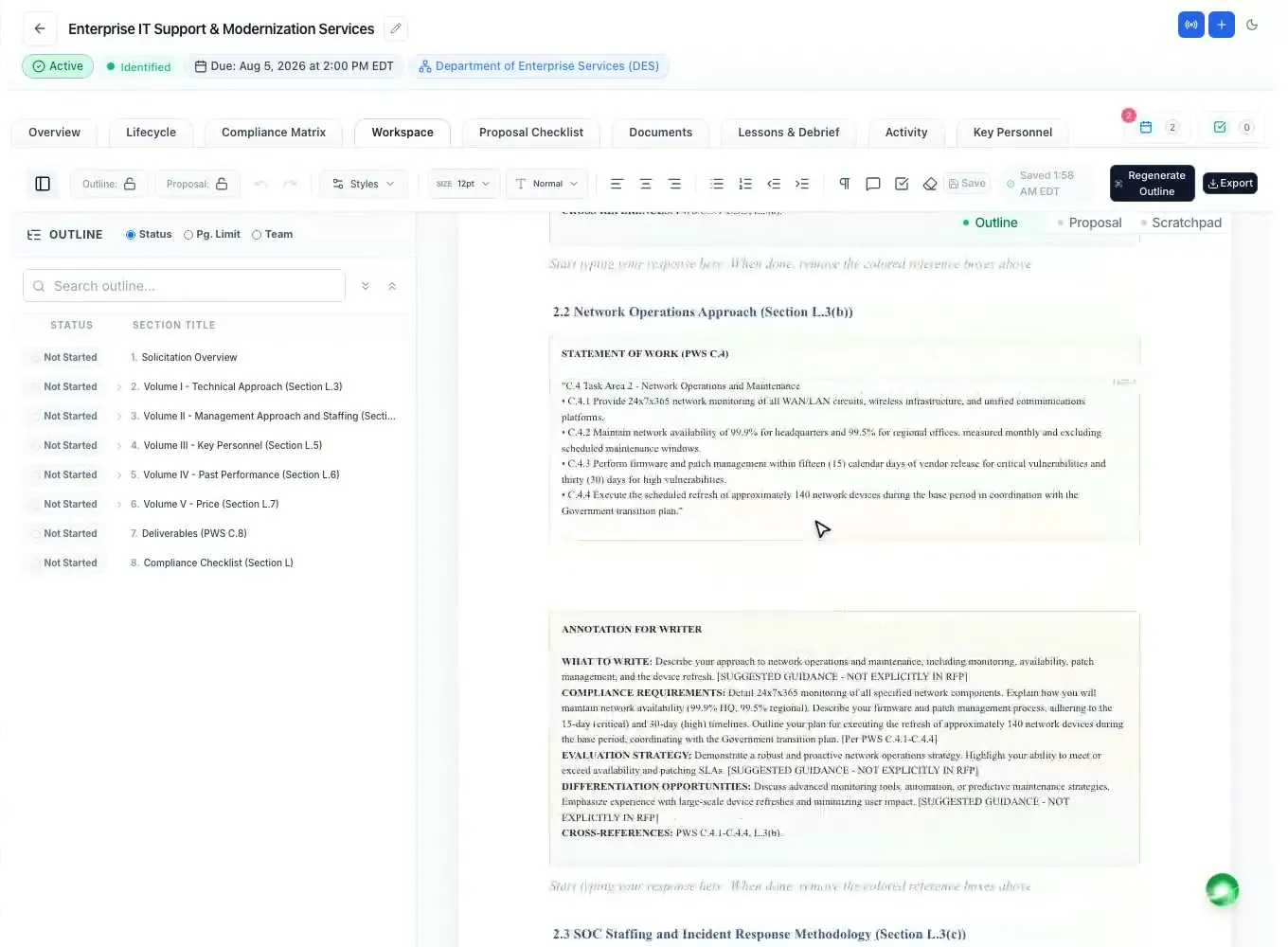
An annotated outline from Section L, Section M and the SOW, with writer guidance.
Read moreProposal outline generator
Updated
A proposal outline generator reads the solicitation and gives you the structure of your response before anyone writes a word. ProposalWorkspace builds an annotated outline from Section L, Section M and the SOW or PWS: the RFP's own volumes in the RFP's order, each heading under the instruction it answers, the source text quoted beside it, writer guidance and the page limits the RFP states.
No credit card. Every feature on every plan.
The proposal's architecture
A proposal outline is the list of volumes, sections and subsections your response will have. An annotated outline goes further: under each heading it shows what the solicitation asks for there, how that part will be evaluated, the page budget, and notes for the writer. It is the document a proposal manager hands to the writers on day one.
On a federal RFP that follows the uniform contract format, the outline comes from three places: Section L (the instructions: volumes, order, page limits, format), Section M (the evaluation factors that the headings should echo) and Section C or the PWS (the work each technical section must address) (FAR 15.204-1; 15.109 in the FAR overhaul text).
Get the outline right and every writer knows what to say, where, and in how many pages. Get it wrong and good content lands where the evaluator is not looking. The step-by-step method is in how to write a federal proposal outline that follows Section L.
From the RFP files
Open the Outline canvas of a proposal and press Generate outline. You pick which solicitation documents it reads (the RFP, its attachments, the SOW or PWS), and the outline is built in the background while you work on something else. If an outline already exists, it asks before replacing it. The AI chat offers the same button.
The generator first finds every volume the RFP asks you to submit and uses the RFP's own volume names, in the RFP's order. It then places every response heading inside the volume its instruction belongs to, so an instruction for the technical volume never lands in the management volume, and adds the subsections the scope of work calls for.
Annotated, not just numbered
Under every heading that needs a written response, the outline carries the page or item limit where the RFP states one, the excerpt of the instruction, evaluation factor or SOW task it was built from (quoted, so a writer never has to hunt through the RFP), guidance for the writer, and a placeholder where the response goes.
At the top sits a solicitation overview: the solicitation number and title, the agency, contract type, NAICS and set-aside, the due date and time, the submission method and the contracting officer. Where the RFP asks for them, the outline also sets out the key personnel resumes, letters of commitment and the reps and certs as placeholders to fill.
State, local and other formats
Many solicitations do not use the uniform contract format: state and local RFPs, and many RFQs, put the instructions in their own "instructions to offerors", "proposal format" or "submittal requirements" section, and the scoring in their own evaluation criteria.
The generator works the same way on those: it reads the instructions wherever the RFP puts them, uses that RFP's own volume or section names and order, and places each response heading under the instruction it answers. See state and local proposal software for the rest of the state and local workflow.
What the outline drives
Edit the outline like any document in the Word-like editor, with federal heading numbering (1., 1.1, 2.1.1) and the heading tree in the outline pane. When the team agrees, lock it. The compliance matrix and the submission checklist are built once the outline is set, and the first draft is written under its headings.
Export the outline at any point: Word (.docx), Word with a table of contents, or PDF, with the same numbering in each. With several volumes, pick which to export; each becomes its own file and several arrive as one .zip.
Prefer an expert-built outline?
If you would rather start from an outline our proposal team built and checked, ready-made annotated outlines for open federal, state and local RFPs are on sale ($199 each on that page), mapped to the solicitation's instructions, evaluation criteria and scope, in editable Word.
For any other RFP, a pre-buy package starts with the RFP-specific annotated outline, with a two-level quality and compliance review and Word style-guide formatting; larger packages add the compliance and cross-reference matrices and more. To see the quality first, the sample library shows real outlines, view only.
How it works
Create the proposal from a SAM.gov or state notice, or upload the solicitation files.
Pick which documents it reads; the annotated outline is built in the background.
Check the headings against the instructions, edit what you need, then lock the outline.
The compliance matrix, checklist and first draft follow the outline's headings.
Every feature is on every plan. Plans start at $99 a month billed annually for Solo with 2 seats ($129 billed monthly), with a 7-day free trial and no credit card. Full pricing
In the product
An annotated outline from Section L, Section M and the SOW, with writer guidance.
Read moreEvery requirement and page limit with its page cite, before the outline is built.
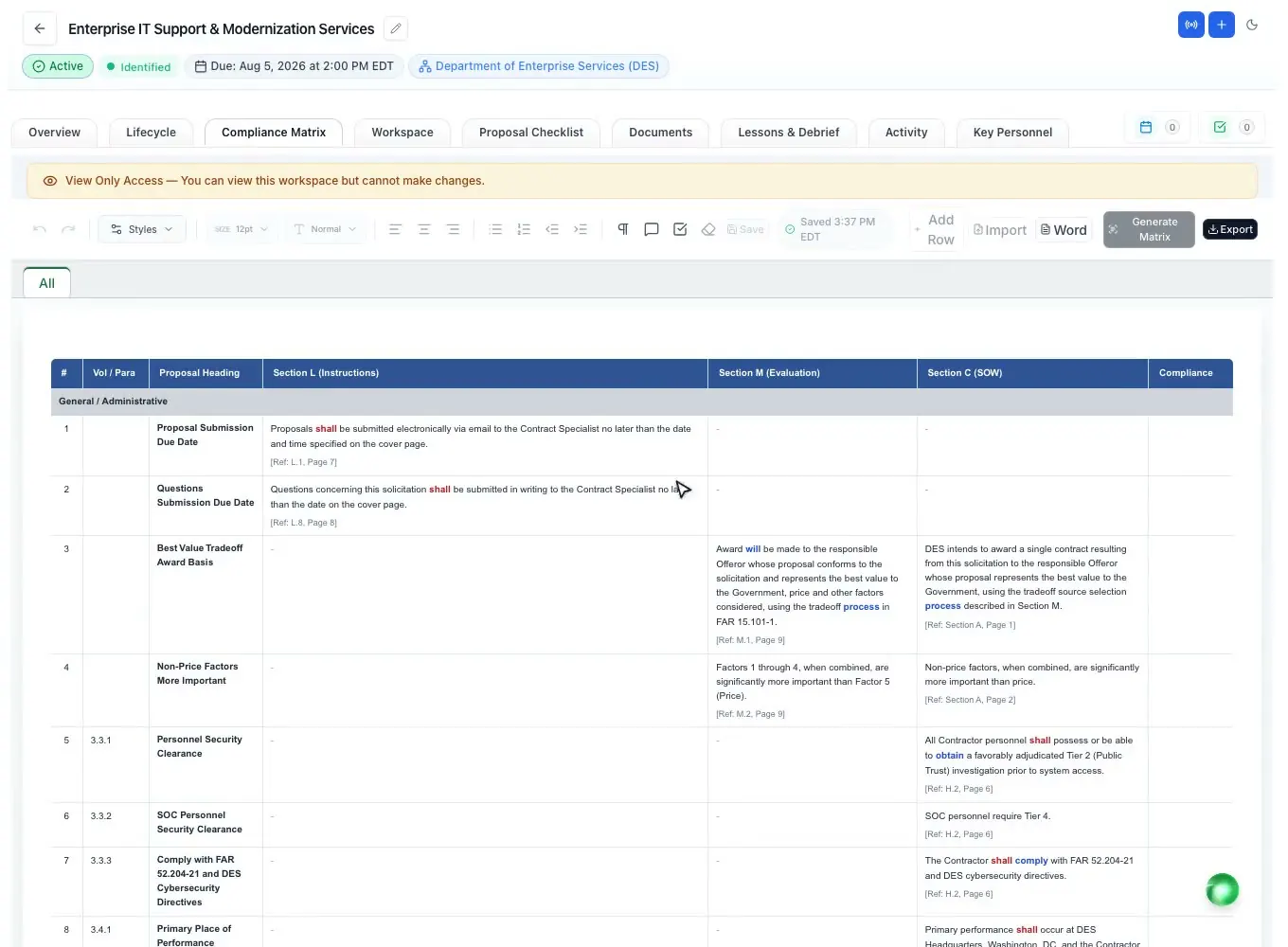
Read moreEach instruction, evaluation factor and SOW task as a row with an owner.
Read moreThe positions the RFP names, with resumes and letters of commitment.
Read moreA first draft written under the outline, from your own records.
Read moreExpert-built annotated outlines for open RFPs, in editable Word.
Read moreQuestions people ask
A tool that reads a solicitation and produces the structure of the response: the volumes, sections and subsections in the order the RFP asks for. ProposalWorkspace builds an annotated outline, with the RFP text, limits and writer guidance under each heading.
An outline where each heading also shows what the solicitation asks for there, how it will be evaluated, the page limit and notes for the writer, so a writer can start without rereading the whole RFP.
It can build a strong one, placing every heading under the instruction it answers and quoting that instruction beside it, so a person can check it quickly. Review it against Section L before you lock it; the proposal manager stays responsible for the structure.
The generator reads the instructions and evaluation criteria wherever the RFP puts them, as most state, local and many RFQ solicitations do, and uses that RFP's own section names and order.
Yes. It opens in the Word-like editor, where you can change, add and reorder headings. Generating again asks before it replaces your outline, and you can lock the outline once the team agrees on it.
Yes: Word (.docx), Word with a table of contents, or PDF, with the federal heading numbering intact.
Every RFP needs its own outline, which is why the generator builds it from the solicitation. To see what a finished one looks like, the sample library shows real outlines, and ready-made outlines for open RFPs are on sale.
 ProposalWorkspace
Set up in minutes
Free trial, no credit card. Claude connector included.