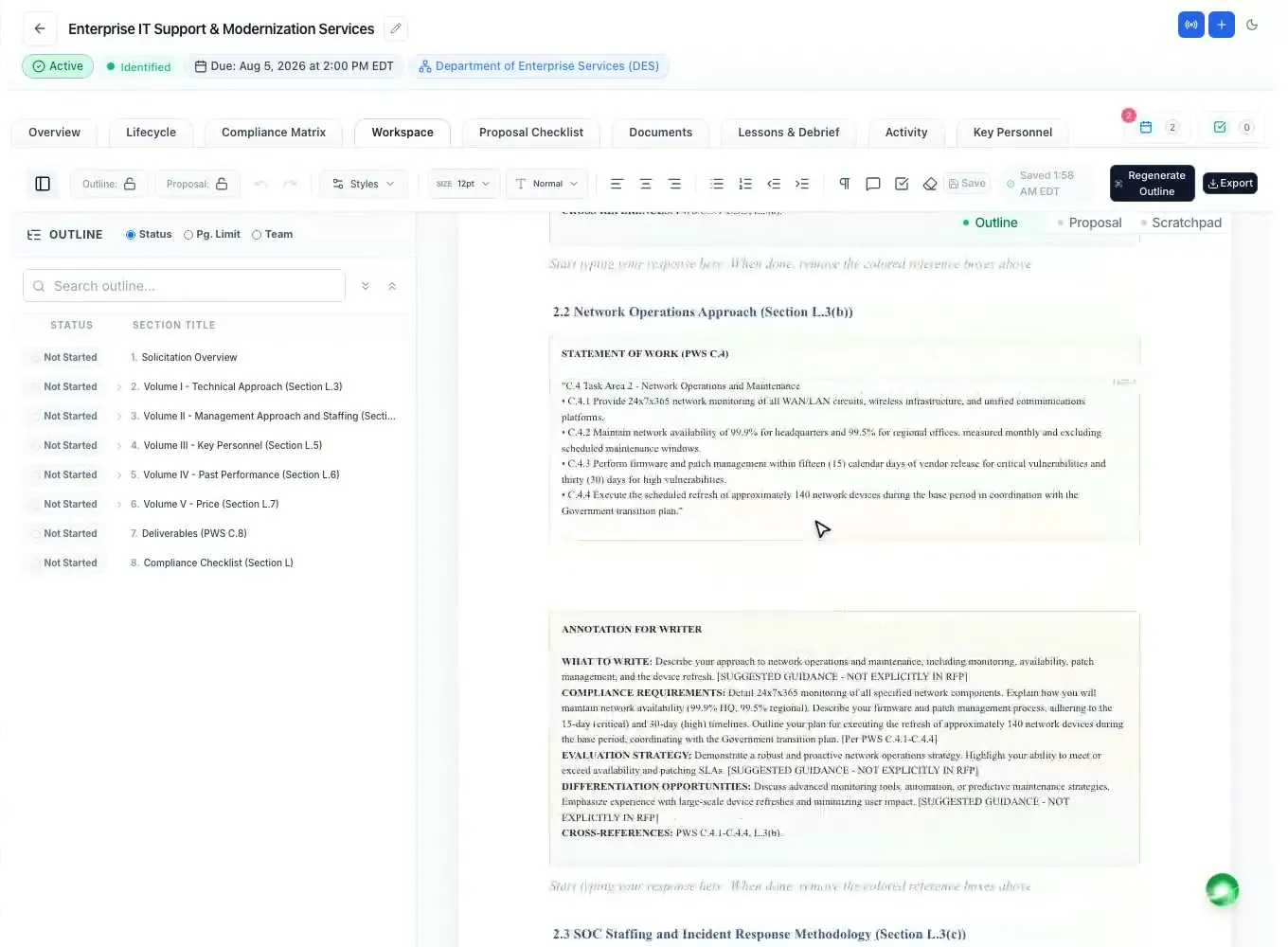
Proposal outline generator
An annotated outline built from Section L, M and the statement of work.
Read moreProposal outline template
Updated
A proposal outline template is a starting shape for a government proposal: the volumes most RFPs ask for (technical, management, past performance and price), the sections inside them, and the forms around them. Use it to plan early, then rename, reorder and resize everything to match the solicitation, because Section L decides the outline and the template never does.
Every feature on every plan, from $99 a month billed yearly.
The basics
A proposal outline template is a reusable list of the volumes and headings a government proposal usually contains. Teams use one to start planning before the final RFP is out: who will write which part, roughly how many pages each will take, and what content to collect.
It is not the outline you submit against. On a federal RFP, Section L tells offerors what to submit, in what order, under what names and within what page limits, and Section M says how each part will be evaluated (FAR 15.204-1; 15.109 in the FAR overhaul text). When the RFP arrives, its instructions replace the template's structure, line by line. A state or local RFP sets its own instructions in the same way.
The common mistake is to keep the template's headings because they are familiar. Evaluators look for their own words in their own order; a section filed under a different name may not be found, and may not be scored. How to build the real one: a federal proposal outline that follows Section L.
The volumes
Most competitive federal RFPs ask for some version of the structure below, often with past performance and price in separate volumes so different evaluation teams can read them. Treat it as a checklist of what is usually there, not as a prescription.
| Part | Typical contents | Planning note |
|---|---|---|
| Cover letter | Solicitation number, offeror name, UEI and CAGE, point of contact, acknowledgment of amendments, signature. | Often outside the page count; check Section L. |
| Volume I - Technical | Executive summary, understanding of the requirement, technical approach task by task, tools and methods, schedule. | Usually the most heavily weighted volume and the tightest page limit. |
| Volume II - Management | Organization and staffing, key personnel, transition plan, quality control, risk management, subcontractor management. | Sometimes merged into the Technical volume. |
| Volume III - Past Performance | Recent, relevant contracts with customer, scope, value, period and results; references or questionnaires. | Recency and relevance are usually defined in Section M. |
| Volume IV - Price or Cost | Pricing schedule, basis of estimate, labor categories and rates, assumptions. | Follow the RFP's pricing template exactly. |
| Appendices | Resumes, letters of commitment, certifications, sample deliverables if allowed. | Check whether they count toward page limits. |
| Forms and representations | Signed SF forms, Section K representations and certifications, the small business subcontracting plan if required. | Missing forms can make a proposal non-responsive. |
Headings and numbering
Inside each volume, use numbered headings (1., 1.1, 1.1.1) so reviewers and evaluators can point to a section, and so the cross-reference matrix has something to cite. Mirror the solicitation's paragraph numbers in your headings where Section L asks for its order; the technical approach usually follows the tasks of the statement of work or PWS one by one.
Give each heading a page budget. Split the volume's limit across sections according to how much each is worth in Section M, not how much there is to say. An executive summary that runs long steals pages from the factor that scores the most.
Under each heading, write a few lines for the writer: which requirement it answers, which evaluation factor it earns, the win theme to carry and the proof to cite. That turns a list of headings into an annotated outline, the document a writing team actually works from.
| Heading | Answers | Page budget |
|---|---|---|
| 1. Executive summary | The whole volume; the win themes | 1 page |
| 2. Understanding of the requirement | The background and objectives of the SOW or PWS | 1-2 pages |
| 3. Technical approach | Each task of the SOW or PWS, in its order (3.1, 3.2, ...) | Most of the limit |
| 4. Management approach | Staffing, key personnel, quality control, risk | As Section L allows |
| 5. Transition | Phase-in plan and schedule | 1-2 pages |
When the RFP arrives
When the final RFP is released, rebuild the outline from Section L. List the volumes exactly as Section L names them, in its order, with its page limits and formatting rules. Then place each Section M factor and each work requirement under the heading that answers it. Anything the template had that Section L does not ask for either finds a home inside a required section or comes out.
Then check it against a compliance matrix: every instruction, evaluation factor and work requirement should point to a heading in the outline. A requirement with no heading is a gap you can still fix; a heading with no requirement is pages you may be spending on nothing.
Lock the outline once the team agrees on it, so headings do not drift while people write. More on the instructions themselves: Section L.
In ProposalWorkspace
ProposalWorkspace builds the outline from the solicitation instead of a template. The built-in AI generates a full annotated outline that follows Section L, M and the statement of work: one volume per the RFP's own volume names, each heading under the instruction it answers, guidance for the writer, page or item limits where the RFP states them, and placeholders for resumes, letters and representations and certifications.
You pick which solicitation documents it reads, it runs in the background, and it asks before replacing an existing outline. The outline pane shows every heading with its status, federal numbering is the same in the editor, the Word export and the PDF export, and the outline can be locked once the team agrees. Writers then draft each section from it, by hand or from an AI first draft. See the proposal outline generator.
How it works
Plan volumes, writers and rough page counts before the RFP is out.
Rename, reorder and resize to the RFP's instructions when it arrives.
Put every evaluation factor and task under the heading that answers it.
Add writer guidance under each heading, then lock the outline and start writing.
Every feature is on every plan. Plans start at $99 a month billed annually for Solo with 2 seats ($129 billed monthly). Subscribe today or book a demo with our team. Full pricing
In the product
An annotated outline built from Section L, M and the statement of work.
Read moreSection L, M and C rows checked against the written proposal.
Read moreFederal heading numbering, page limits per section and tracked changes.
Read moreA first draft of every section from the outline and your Company Library.
Read moreEach volume exported with the numbering intact, several as one .zip.
Read morePage limits, evaluation factors and key personnel found with page cites.
Read moreQuestions people ask
A reusable list of the volumes and headings a government proposal usually contains (technical, management, past performance, price and the forms around them), used to plan before the RFP's own instructions are known.
Not unchanged. Section L of a federal RFP, or the instructions of a state or local RFP, sets the volumes, order, names and page limits. Rebuild the outline from those instructions when the RFP arrives.
Often a technical volume, a management volume (sometimes merged with technical), a past performance volume and a price or cost volume, plus a cover letter, appendices and forms. The RFP decides the actual list.
An outline with a few lines of guidance under each heading: the requirement it answers, the evaluation factor it earns, the win theme to carry and the proof to cite. See annotated outline.
By what each section is worth in Section M, not by how much there is to say. The most heavily weighted factors get most of the pages.
Yes. The built-in AI generates an annotated outline that follows Section L, M and the statement of work, with writer guidance and page limits, which you can lock and export to Word or PDF.
ProposalWorkspace starts at $99 a month billed annually ($129 billed monthly) for 2 seats, with every feature on every plan. See pricing or book a demo.
 ProposalWorkspace
Set up in minutes
Plans from $99 a month, billed yearly. Subscribe today or book a demo with our team.