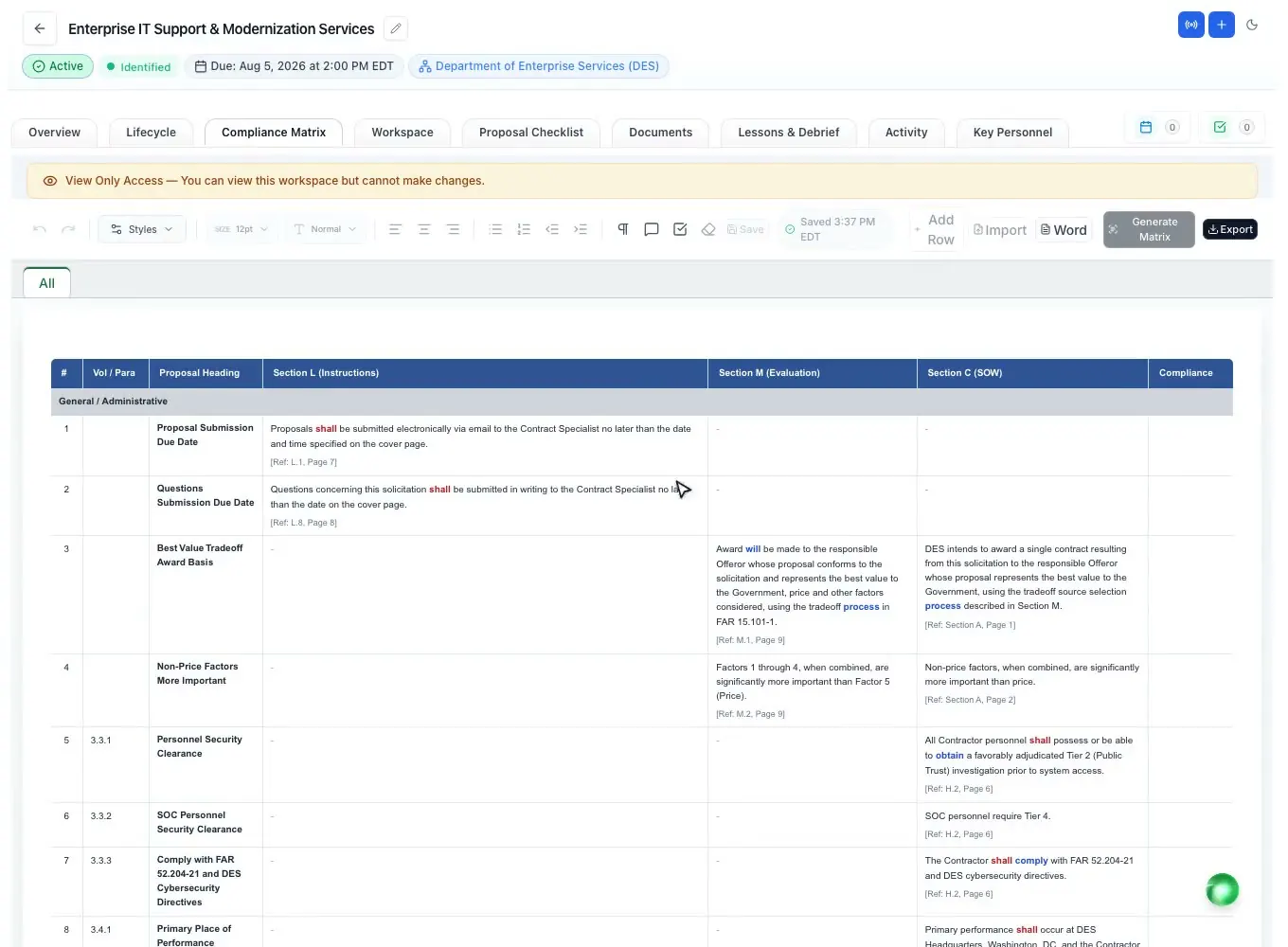
Compliance matrix
Section L, M and C decomposed into rows with a page reference, an owner and a compliance call.
Read moreCompliance matrix template
Updated
A compliance matrix template is a table with one line per requirement in the solicitation: where it comes from, what it says, whether it is binding, where your proposal answers it and who owns it. Download the blank Excel template below, fill it from Section L, M and C, or let ProposalWorkspace build the matrix from the RFP with a page reference on every line.
Every feature on every plan, from $99 a month billed yearly.
The basics
A compliance matrix template gives you an empty, ready-made table for tracking every requirement of a solicitation against the proposal you are writing. Each line holds one obligation, copied in the solicitation's own words, with its source, its page and the place in your proposal that answers it.
On a federal RFP the requirements come from three places. Section L tells offerors what to submit and how to format it, Section M says how the proposals will be evaluated (FAR 15.204-1; 15.109 in the FAR overhaul text), and Section C or the statement of work describes the work itself. State and local RFPs use their own section names, but the same three kinds of requirement are there: instructions, evaluation criteria and scope.
The matrix is how a team proves to itself that nothing was missed. Evaluators read the proposal against the solicitation; a missing "shall" can make a proposal unacceptable, and a weakly answered evaluation criterion costs points. The template makes that check visible to everyone who writes or reviews a section. More on the idea itself: what a compliance matrix is.
The template
The blank template is an Excel workbook with the eleven columns below and a second sheet that explains how to fill them. It uses generic column names that work for federal, state and local solicitations, so you can add or rename columns to match a specific RFP.
Keep the template as your starting point, save a copy per solicitation, and write the solicitation number, the latest amendment and the update date in the header row so reviewers know which version they are reading.
| Column | What goes in it |
|---|---|
| ID | A running number for the line (1, 2, 3 ...), so reviewers can point to it in comments. |
| Source (section and paragraph) | Where the requirement is written, for example L.4.2, M.2.1 or PWS 3.1. |
| Page | The page number in the file you were given, so anyone can find it in seconds. |
| Requirement (in the solicitation's own words) | The sentence copied word for word. Paraphrasing is how requirements get lost. |
| Type | Instruction (Section L), Evaluation (Section M), Work (Section C, SOW or PWS) or Other (Sections F, G, H, J or an attachment). |
| Binding | Whether the wording obliges you: "shall" or "must" is binding, "should" is a preference, "may" is optional. |
| Answered in (volume and section) | The volume and heading of your proposal that responds, for example Vol. I, 2.3. |
| Owner | The one person responsible for the answer. |
| Status | Where the answer stands: not started, drafted, reviewed or final. |
| Compliance | Your call after review: compliant, partly compliant, not compliant or an exception you will take. |
| Notes | Questions for the contracting officer, the amendment that changed the line, or a reviewer's comment. |
Filling it in
Work through the solicitation in order and give one line to each obligation. A sentence such as "The offeror shall describe its staffing approach and shall provide resumes for all key personnel" holds two obligations, so it becomes two lines. Splitting them is what lets you prove later that both were answered.
Start with Section L, because it decides the structure of your proposal: volumes, page limits, fonts, file names and the order of the content. Then add Section M, and map every evaluation factor and subfactor to the section that will earn the points. Last, add the work requirements from Section C, the statement of work or the performance work statement, so the technical approach answers each task.
Mark the binding words as you go. A missed "shall" or "must" can make a proposal unacceptable; a missed "should" usually costs a weakness. Do not forget the sections people skip: Section H special requirements, Section J attachments and the clauses in Section K and I that ask for a certification or a plan.
Then keep it current. When an amendment arrives, compare it with the base solicitation, update or add the lines it changes and write the amendment number in Notes. At each review, update Status and Compliance so the team sees what is left.
What goes wrong
Most compliance failures are not about writing quality. They come from a requirement nobody listed, a page limit nobody counted, or an amendment that changed a line after the section was written. The template's columns exist to catch those.
Paraphrasing is the first mistake: once a requirement is summarized, the exact obligation is gone. The second is grouping several requirements into one line, which hides the one that was not answered. The third is listing requirements without saying where they are answered; the "Answered in" column turns the matrix into a cross-reference that reviewers and, when the RFP asks for one, evaluators can follow. Read more in Section L, M and C explained.
In ProposalWorkspace
In ProposalWorkspace the built-in AI decomposes Section L (instructions), Section M (evaluation) and Section C or the PWS (work) into matrix rows, with the requirement in the solicitation's words and a page reference, on a full-page landscape canvas. Binding and optional words are color-coded inline: shall and must, should, may, will and ambiguous wording each get their own color.
Each row has an Owner and a Compliance call (Compliant, Partial, Non-Compliant or Exception) you set with a click, and a summary banner shows how many requirements there are, how many are assessed and turns red on any non-compliant row. One click checks every row against the written proposal and reports where each is answered, or that it is not addressed yet. The matrix exports to Excel and Word.
When an amendment arrives, it is compared with the base RFP and the changes are applied as tracked changes. The full feature: the compliance matrix.
How it works
Save a copy per solicitation and fill in the header: solicitation number, amendment, date.
One line per instruction, in the solicitation's words, with the source and page.
Map every evaluation factor and every work requirement to the section that answers it.
Give each line an owner, then update Status and Compliance at every review.
Every binding line answered, every amendment folded in, nothing left open in Notes.
Every feature is on every plan. Plans start at $99 a month billed annually for Solo with 2 seats ($129 billed monthly). Subscribe today or book a demo with our team. Full pricing
In the product
Section L, M and C decomposed into rows with a page reference, an owner and a compliance call.
Read moreEvery requirement extracted with a page or section cite, plus the bid/no-bid worksheet.
Read moreSubmission details, page limits and formatting rules from the RFP, each with a status.
Read moreAn amendment compared with the base RFP and applied as tracked changes.
Read moreRequirement coverage and page limits checked in the document you are finishing.
Read moreAn annotated outline that follows Section L, built before the matrix.
Read moreQuestions people ask
A ready-made table for listing every requirement of a solicitation, one per line, with its source, page, binding status, the proposal section that answers it, an owner and a compliance call. You copy it per solicitation and fill it from Section L, M and C.
At least: an ID, the source section and paragraph, the page, the requirement in the solicitation's own words, the type (instruction, evaluation or work), whether it is binding, where it is answered, the owner, a status, a compliance call and notes. The blank template on this page has exactly those eleven columns.
The download is an Excel workbook (.xlsx), because filters and sorting help on long solicitations. ProposalWorkspace exports its own matrix to both Excel and Word.
Yes. State, county and city RFPs use their own section names, but they still contain instructions, evaluation criteria and a scope of work. Use the Source column for whatever numbering the RFP uses.
A compliance matrix tracks every requirement for the team. A cross-reference matrix is the short table, often required by Section L, that shows evaluators where in the proposal each requirement is answered. The "Answered in" column of the template becomes that table. See cross-reference matrix.
Yes. The built-in AI builds the matrix from Section L, M and C with a page reference on each row, and you set the owner and compliance call per row. It exports to Excel and Word.
ProposalWorkspace starts at $99 a month billed annually ($129 billed monthly) for 2 seats, with every feature on every plan. Subscribe from pricing or book a demo.
 ProposalWorkspace
Set up in minutes
Plans from $99 a month, billed yearly. Subscribe today or book a demo with our team.